

Video marketing is shaping the world with 2 billion logged-in monthly users for YouTube alone. This number seems to be underreported because many people watch YouTube content without creating an account. However, it is the most popular digital video platform in America. Top brands are making the best use of YouTube to inform, inspire, and delight their target consumer base.
eMarketer predicts that the number of YouTube watchers in the USA will rise from 214.9 million in 2020 to 228.1 million by 2024.
The pandemic has significantly impacted YouTube Viewing and Ad Revenues because most of the world’s population turned to this social video platform, replacing in-person events and activities.
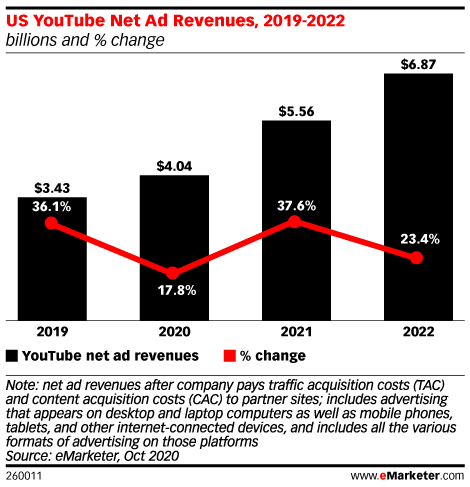
YouTube is a full-funnel solution where content feels like real life. It allows brands to establish a more substantial online presence through the strategic use of video ads. According to Google, 70% of people say they have purchased products from a brand as they found them on YouTube.
Consumer intent plays a vital role in digital video advertising than demographic data to better tailor your ads to what people want to see.
YouTube in-stream ads targeted by user intent have a 100% higher lift in buying intent than ads targeted by demographics.
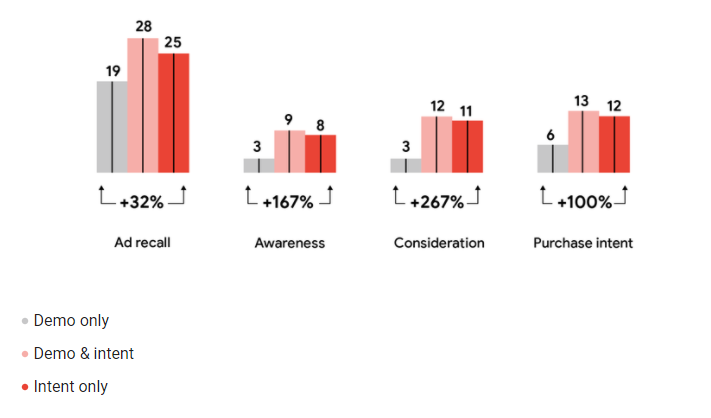
Source: Think with Google
Also, they are less likely to skip ads and watch the ads targeted by intent for longer than ads targeted by demographics.
YouTube advertising is an effective video solution that drives action and results which matter to you the most.
Video ads as new storefront:
From increasing watch time to driving brand lift and sales across the funnel, relevant ads based on viewers’ purchase intent cause a significant decrease in skipping rates and an increase in customer acquisition and retention.
With all these YouTube advertising growth trend statistics, it becomes evident that you should fit YouTube in-stream ads in your digital marketing strategy. Just like a web development company cannot survive the competition without the latest tech stack implementation in their customized business solution.
If you want to strengthen your brand’s online presence, increase user engagement and drive sales, then you should be creating and running in-stream YouTube video ads.
Types of in-stream ads:
These sponsored videos are Google ads that appear in its monetized organic content. Displayed on YouTube and partner sites and apps in embedded videos, these ads are classified as:
YouTube in-stream skippable ads:
Normally, 6min long, viewers can skip these ads after 5 seconds to move ahead to organic video content.
YouTube in-stream unskippable ads:
Viewers have to watch the entire ad (it could be 15 seconds long) before the organic video content plays.
YouTube in-stream bumper ads:
This quick 6-seconds video ad is unskippable, and viewers have to watch it in full before the YouTube video plays automatically.
For example, this Lusha in-stream ad is in skippable video advertising format. It prioritizes the dynamic visuals over squeezing the content in short unskippable or bumper ads, making it compelling enough for viewers to ignore the ‘Skip Ads’ prompt and watch it till the end.
 Skippable In-Stream Ad
Point to Remember: Digital marketers can have granular control over YouTube advertising content, serving their ads and the target audience to see their sponsored video ads. However, Google limits the authority of advertisers over ads placement in YouTube videos. For example, your ads could appear pre-roll or as a mid or post-roll as Google wants. It means you cannot specify where your ad plays in the accompanying video. All you need to care about is whether or not your ads are driving conversions instead of where Google displays your in-stream ad in the organic video content.
Benefits of in-stream video ads :
Advertisers put their money in YouTube ads for conversions. But, besides this ultimate goal, videos ads offer surprising perks to businesses across industries.
Targeting ideal consumer base:
The Google Ads interface allows YouTube advertisers to access a lot of audience targeting options for all types of in-stream ads. For example, you can target ideal viewers by:
|
Demographic data |
age, location, gender, employment, income, etc. |
|
Affinity audiences |
people with interests related to your products/services |
|
Similar audiences |
people with buyer personas identical to your valuable customers |
|
In-market audiences |
active shoppers who tend to buy what you sell |
|
Remarketing audiences |
people who already have shown interest in your products/services |
Get the most for any budget:
You can maximize your results for any budget. Most businesses start advertising with $10 per day for local campaigns (local audiences and a broader range of potential consumers). You can set any budget that works for you in getting the desired results. You can also pay only for the watched ads. For example, you will be charged only when people watch your TrueView ads for at least 30 seconds.
You do not have to spend a billion-dollar budget for pre-roll ads. Just keep testing and optimizing your ads for YouTube w.r.t to targeting, messaging, and bidding strategy for improved output.
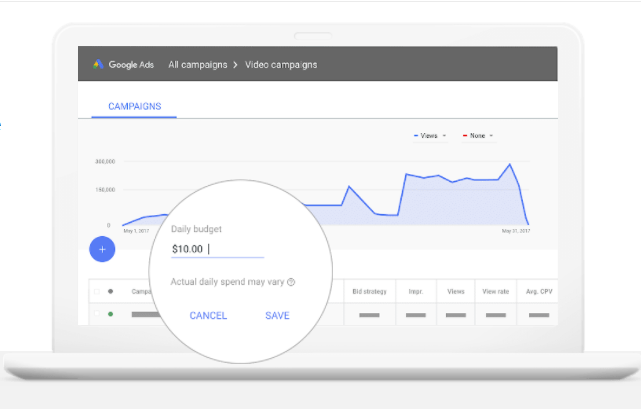 Source: YouTube Ads
Target customers throughout marketing funnel :
In-stream ads help advertisers reach customers through their journey instead of targeting only those at the top of the sales funnel. You can create ads for every stage of your marketing funnel – awareness, consideration, conversion.
The monday.com pre-roll ad below highlights the most valuable features of this work management’s platform, making it an ideal ad for your mid or lower-funnel audience ready to click the ‘Start Now’ button.

Create in-stream ads like a pro:
Now, with all this at your fingertips, you can easily set up your first YouTube ad campaign. Follow the step below and start creating your in-stream YouTube ads.
Note: Google will guide you throughout the campaign setup.
1. Create a short video in a pre-roll style that effectively spotlights your products and/or services. Try to be unconventional, simple, and innovative.
Highlight your business benefits, demonstrate the key differentiators, and walks them through the platform. Entertain viewers instead of serious advertising appeal. Make them smile or be curious or surprise them to catch people’s attention quickly.
2. Set up the conversion tracking action from your Google Ads account. Select the type of conversions you want to track, depending on your goals, such as tracking site visits, phone calls, or sales.
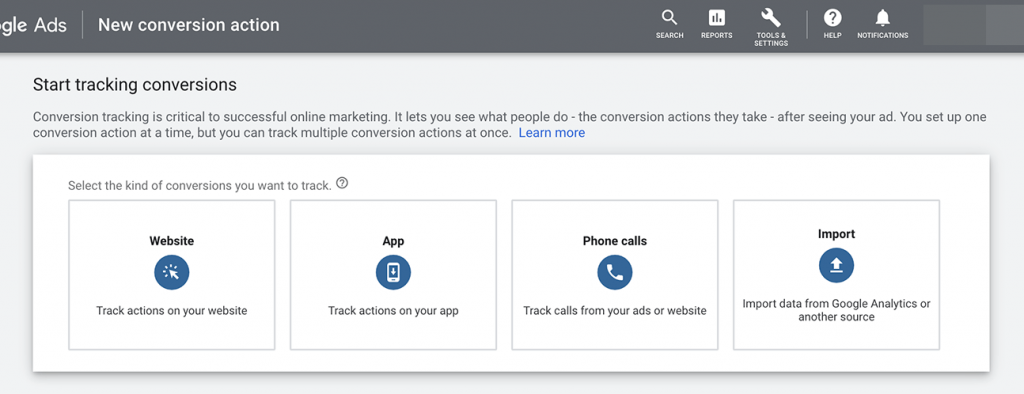
3. Choose your campaign goal and type for your in-stream ad. You can select any of the following objectives.
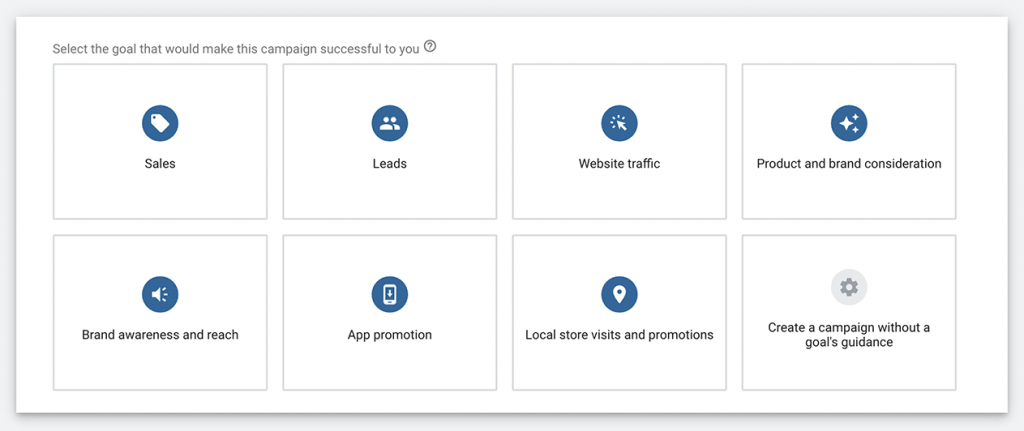
For example, you select brand awareness and reach. Then, depending on this objective, you need to choose a campaign type.
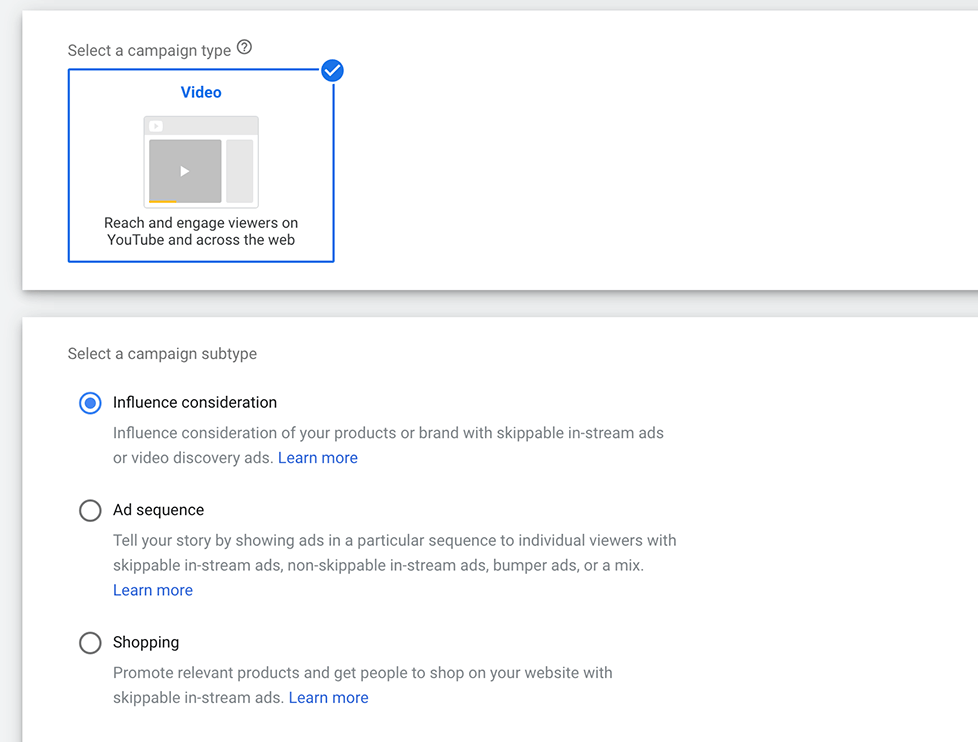
Choose video as your campaign type for your in-stream video ad and then a campaign subtype to fine-tune your goal.
KEY TAKEAWAY
You can categorize your video ad as Bumper and Skippable or Non-Skippable In-Stream if you select Brand Awareness and Reach objective. On the other hand, if you choose Website Traffic as your campaign objective, you need to create a responsive ad that can be displayed in different ad formats.
4. Select and implement campaign settings like name, bid strategy, daily or lifetime budget, target language, inventory type, location, etc.
Pro Tip:
Add at least two sitelink extensions to your video ads if you want to give your YouTube viewers more opportunities to take action and convert. With this, you can direct your audience to your portfolio, contact page of the e-store landing page, etc.
5. Create your ad group and set targeting parameters. Also, add your keywords list to target.

Now, start adding other key elements enlisted below and repeat the process to create as many YouTube In-Stream Video Ads as you would like.
- Landing page URL (you can also add a display URL)
- Call to action (CTA) in TrueView in-stream campaigns
- Ad Headline (up to 90 characters); short headlines are preferable
- Ad description (70 characters); appear only in video discovery ad formats
- Tracking data; add URL parameters to your landing page to track user behaviors.
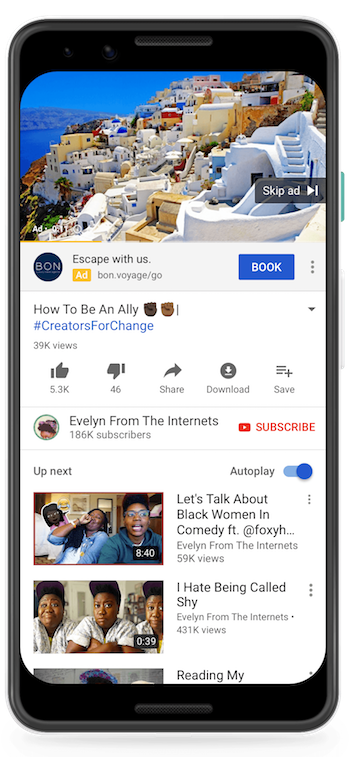
After entering all required information, you can preview your in-stream ad on YouTube, as shown below.

Launch your ad, and it will appear like this.
Source: Google Ads Help
Start monitoring your results and optimize your in-stream video ad campaign for YouTube.
Leverage YouTube ads optimization:
In the following ways, you can optimize your ad campaigns for YouTube to ensure everything is on the right track.
- Update messaging
- Adjust your bids
- Review targeting
Keep creating YouTube in-stream ads that sell.
If you don’t know how to maximize the results, contact dedicated digital marketers like ours at ArhamSoft (Pvt) Ltd., and they will walk you through the whole process or can skillfully manage your paid campaigns of any type and scale.